For people in the flow

One space to run all your personal projects. We capture your flow of work and help you bring order to it. And yes — it’s beautiful.

How it works
14 days free, then from $7/month. No card required.
www.vengoflow.com
VengoFlow
Search⌘K
All projects
All notes
PROJECTS
Hiring: Product Designer6
Web app: MVP7
Freelance orders5
New project
AK
Anna Krylova
Personal plan
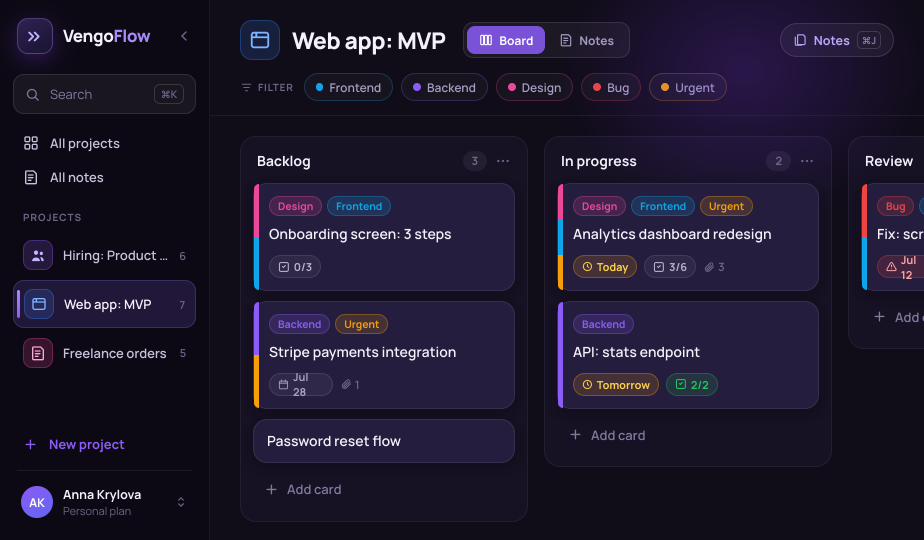
Web app: MVP BoardNotes
FILTER Frontend Backend Design Bug Urgent
Backlog3···
DesignFrontend
Onboarding screen: 3 steps
0/3
BackendUrgent
Stripe payments integration
Jul 281
Password reset flow
In progress2···
DesignFrontendUrgent
Analytics dashboard redesign
Today3/63
Backend
API: stats endpoint
Tomorrow
Review1···
BugFrontend
Fix: scroll jitter in Safari
12 tasks overdue
7 tasks for today

Great for things like:

{{ t.label }}
{{ t.label }}

How it works

01

Intuitive at first glance

Project → columns → cards, drag with your mouse — clear from the first second. But a card here isn’t just a line: inside there’s a field for a detailed description, the option to attach permanent links, any files with image and PDF preview right in the project, custom labels in any color, and recurring actions for the routines you can’t forget. You can pin a personal note to every card.
Card · over the board
A VengoFlow project board
Course launch In progress
Draft a launch action plan
Planning Content Important + Label Today
Description
To a note B
Goal: put together a step-by-step plan and miss nothing at launch.
• Pick the date and venue
• Break tasks down by week
• Prepare the announcement and assets
Draft — in notes.
Done Archive Delete Created Jul 12, 2026
02

Notes right where the work happens

Every project has its own space for notes: ideas, drafts, text, and just your thoughts. Pin notes to cards, summon a quick panel with a hotkey, highlight what matters, and copy what you need in one click.

Notes · blog & design
VengoFlow
Search
All projects
All notes
PROJECTS
Blog
Clients
Personal
New project
AK
Anna K.
Personal plan
Blog BoardNotes Notes ⌘J
New note
Search notes
Content plan for the month
Post topics, publish dates, drafts
today
Article ideas
Guides, cases, reviews
yesterday
Moodboard: covers
References, palette, fonts
5 days ago
Content plan for the month
Edited today
H B I
We publish twice a week. Calm tone, to the point, no fluff.
Mon — a kanban guide
Wed — client case: before & after
Fri — roundup of favorite tools
References: dribbble.com/shots
03

Cross-project search

On the left — a list of your projects and notes, switching is instant. Cross-project search finds the right note or task across everything at once. “I wrote that down somewhere” stops being a problem.

Cross-project search across everything
Cross-project search
All notes
access
Hiring: Product Designer
Job-board logins
Boards for posting openings. Don’t share with third parties.
Web app: MVP
Access: staging & DB
Dev environment. Don’t commit secrets to the repo.
Freelance orders
Landing page copy
Hero, subhead, and offer for a coffee shop.
Hiring: Product Designer
Ranges by level
Market salary ranges as of July.
Found in 3 projects
04

The core principle — nothing extra

This isn’t a tool for advanced product managers. No roles, assignments, approvals, or group work. No Gantt charts, sprints, or reports. But there are to-do lists, deadlines, and notes.
Gantt & sprints Roles and approvals Reports and endless settings
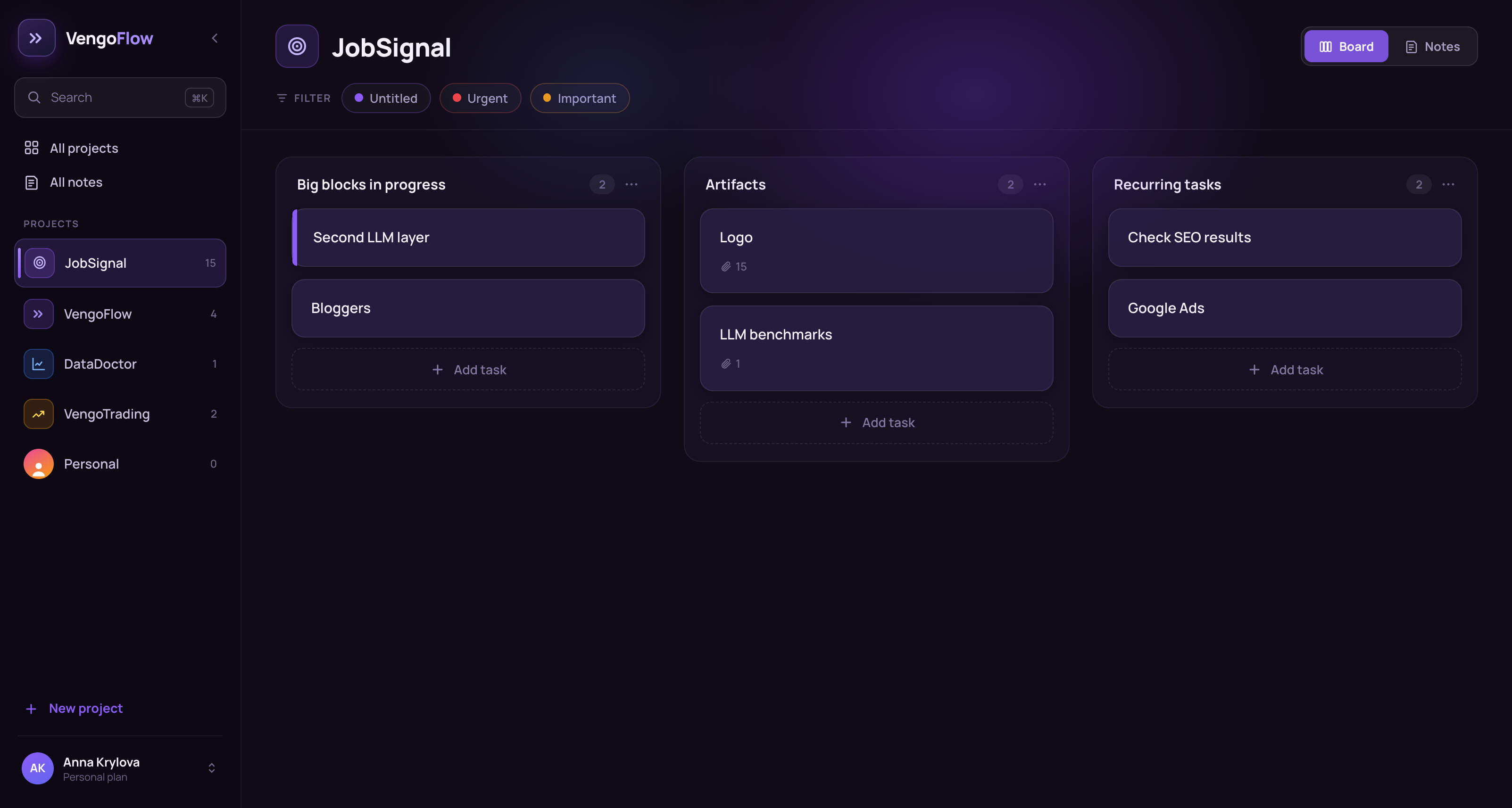
JobSignal · board
The JobSignal board in VengoFlow
05

Google Calendar integration

Keep your schedule and tasks in sync with your calendar. Add it in one place — it shows up in the other.

Google Calendar sync
July 2026
16 Google Calendar
Mon
14
Tue
15
Wed
16
Thu
17
Fri
18
Sat
19
Sun
20
15:00
Standup
Google · Meet
Client call
10:00 · deadline
Dashboard redesign
all day
Stats API
14:00 · deadline
Stripe integration
VengoFlow tasks with a deadline appear automatically in Google Calendar
Who it’s for

Who it’s for and why

Campaign · summer
Launch
4,2%
CTR ↑
B
CTR ↑ 4,2%
A/B test
Impressions
Marketers

Campaigns, launches, hypotheses. Each one a card with a checklist and a deadline.

Retention · cohorts68%+12
Cust-dev #8
H1
Funnel
Data
Analysts & researchers

Customer research, interviews, hypotheses. A note pinned to the task — insights don’t get lost.

Board · MVP
BACKLOG2
IN PROGRESS2
DONE1
Spec
MVP
Roadmap
Tasks
Solo founders & product folks

The whole backlog and docs in one place.

Thesis · chapter 2
sources.pdfp. 14
Lectures
by Jun 12
Thesis
64% done
Sources
Students & grad students

Courses, deadlines, thesis. Summaries in notes, source links in attachments.

Course curriculum
Students
Materials
Performance
72% done
Homework
Teachers & tutors

Students as cards, curriculum as columns, materials for every lesson.

Sessions · week
Mon
Tue
Wed
Thu
Fri
IPIrina P. · 3rd session
History
Tue 15:00
Agreed ✓
Session plan
Consultants & coaches

Clients, sessions, agreements. The full history of each — in a single card.

Interviews · 3 candidates
AKProduct Designerfinal
DVFrontend Devtech
ESAnalystscreen
Note
12 responses
Stages
OFFER
Recruiters & HR

Hiring funnels as columns, candidates as cards, notes on each one right beside it.

Artboard
Palette
References
Files
Designers & freelancers

Client projects, briefs, references, and files in one place.

Order #128In progress
Storefront · install$130
Materials$100
Delivery$40
Romashka LLC$270
Invoice · #A-14
Supplier
Tasks per location
Small business & studio owners

Orders, suppliers, tasks per location — without rolling out a corporate system. Every order is a card with a status, and suppliers and details live in notes right beside it.

23,500+ people already on board

Reviews

Ava Vance
Ava Vance
29 · solo founder
★★★★★5,0

I run three projects at once, and each used to live in its own place: tasks here, notes there, files somewhere else. Now each has its own board with its own notes — open it and you’re instantly in context. Basically a command center, just without the team.

Megan Klein
Megan Klein
31 · recruiter
★★★★★5,0

I honestly tried to live in a spreadsheet. Lasted about a month and a half. Here it’s just columns by stage and a card per person — after a call I jot a couple of lines next to it, and I don’t have to remember a week later which of them asked about remote work. Then I got hooked and started a second board, a home one: renovation, measurements, tile photos. Turned out handier than the chat with my husband.

Olivia Turner
Olivia Turner
38 · freelance designer
★★★★★4,9

I keep a board per client. Brief, images, files — all in the card, no digging through chats. The real treat is that notes sit right next to the task: my notes used to be in one place and my tasks in another, and I ran between them.

Nathan Sharp
Nathan Sharp
34 · owns a small studio
★★★★★5,0

I basically got myself a place where everything lives. Orders, contractors, invoices. Before that it was twenty tabs and a constant feeling I’d forgotten something. Now I forget on purpose.

Peter Grant
Peter Grant
41 · product lead
★★★★★4,9

I run four tracks at once, and my main pain was switching between them. Here each one has its own board and its own notes: jump in and you’re right on topic. And this is my personal space — I don’t drag in what’s only for the team.

Danielle Reed
Danielle Reed
24 · marketer
★★★★★5,0

I started with work tasks, then began running my job search here too: applied → interview → rejection (that column got big, ha). After every conversation I immediately write down what they asked and how I answered. A month in, I have a whole archive that shows exactly where I’m falling short.

Bring order to your flow of work

14 days free, then from $7/month. No card required.
VengoFlow
{{ authTitle }}
{{ authSub }}
or
By continuing, you agree to the Terms of Use and Privacy Policy.